Viewing Process Statuses
You can view the statuses of the currently running OVOC applications.
| ➢ | To view the statuses of the current OVOC applications: |
| 1. | From the OVOC server Management root menu, choose Status, and then press Enter. |
Application Status in Standalone Mode
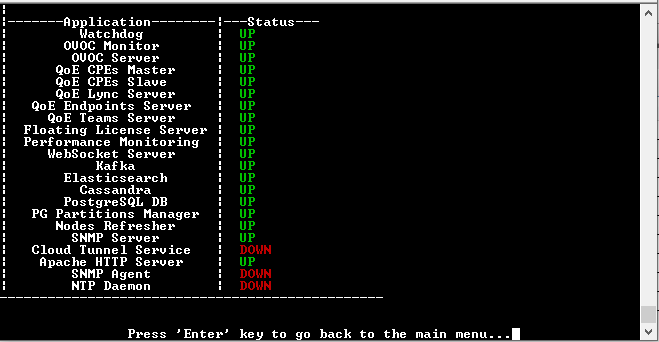
The following table describes the application statuses when OVOC runs in Stand-alone mode.
Application Statuses in Stand-alone Mode
|
Application |
Status |
|||||||||
|---|---|---|---|---|---|---|---|---|---|---|
|
Watchdog |
Indicates the status of the OVOC Watchdog process. |
|||||||||
|
OVOC Monitor |
Validates the local OVOC server connection, clock configuration and installed software version. |
|||||||||
|
OVOC Server |
Indicates the status of the OVOC server process. |
|||||||||
|
QoE CPEs Master |
Indicates the voice quality master process status on the local server. |
|||||||||
|
QoE CPEs Slave |
Indicates the voice quality slave process status on the local server (identical to QoE CPEs Master process in Stand-alone mode). |
|||||||||
|
QoE Reporting Server |
Indicates the status of the QoE Reporting Server for managing Microsoft Teams Calls Notifications. |
|||||||||
|
QoE Lync Server |
Indicates the status of the process that is responsible for retrieving Skype for Business calls and for monitoring connectivity status with Microsoft Lync server. |
|||||||||
|
QoE Endpoints Server |
Indicates the status of the Endpoint Server, which manages the UDP connection with the Endpoints (IP Phones) for Voice Quality Package SIP Publish RFC 6035 messages. |
|||||||||
|
QoE Teams Server |
Indicates the status of the OVOC process (QoE Teams Server – Up/Down) that is responsible for retrieving Teams Call Records from defined MS Teams Tenants and for monitoring connectivity status with MS Teams Tenants. |
|||||||||
|
Floating License Server |
Indicates the status of the connection between the OVOC server and the Floating License service. |
|||||||||
|
Performance Monitoring Server |
Indicates the status of the internal SNMP connection used by the OVOC server for polling managed devices. |
|||||||||
|
WebSocket Server |
Indicates the status of the internal connection between the WebSocket client (OVOC Web interface) and the OVOC server. This connection is used for managing the alarm and task notification mechanism. |
|||||||||
|
Kafka |
Indicates the status of the Kafka process for managing alarms retrieved from the VQM and PM servers. |
|||||||||
|
Cassandra |
Indicates the status of the Cassandra database that manages Call Details and SIP Ladder messages. |
|||||||||
|
PostgreSQL DB |
Indicates the status of the PostgreSQL DB. |
|||||||||
|
PG Partitions Manager |
Indicates the status of the process used to partition database for saving OVOC data including Calls, Summaries, History Alarms and Floating License Manager tables. |
|||||||||
|
Nodes Refresher |
Indicates the status of the process used to cycle through all devices to verify SNMP or HTTP connectivity. |
|||||||||
|
Cloud Tunnel Service |
Indicates the status of the Cloud Tunnel Service (see Configure OVOC Cloud Architecture Mode (WebSocket Tunnel). |
|||||||||
|
Apache HTTP Server |
Indicates the status of the Apache server, which manages the following connections:
|
|||||||||
|
SNMP Agent |
Indicates the status of the Linux SNMP Agent process. This agent is not responsible for the SNMPv2/SNMPv3 connection with the AudioCodes devices. |
|||||||||
|
NTP Daemon |
Indicates the status of the NTP Daemon process. |